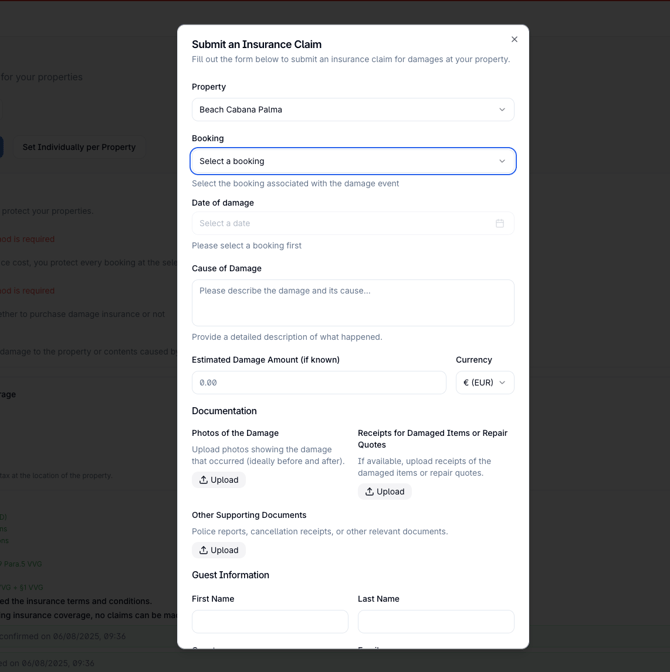
If in a rare case you do have a damage please follow the process of adding your claim into the Stellar Claim Form
Steps to Submit an Insurance Claim in Stellar
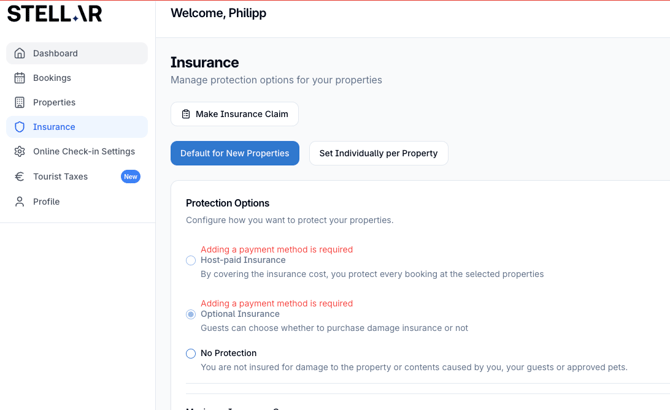
Step 1: Navigate to Insurance
- From the Stellar dashboard, go to Insurance
- Click on the option to "Make Insurance Claim"
Step 2: Select the Accommodation and the booking
- In the Insurance Claim pop-up form, select the accommodation related to the damage from the dropdown list and same for the booking
Step 3: Provide Damage Information
- When did the damage happen? Enter the date when the incident occurred.
- What caused the damage? Provide a brief description of what led to the damage.
Step 4: Upload Required Documents
Multiple document uploads are allowed. Upload the following files if applicable:
- Photos of damage (before and after - make sure to send photos with timestamps, all iphone photos have them included - just send the originals): Upload pictures showcasing the condition of the property before and after the damage.
- Receipts or quotations for repairs: Attach any estimates or receipts related to the cost of repairs.
- Other supporting documents: Upload additional files like police reports for stolen goods, cancellation receipts for loss of income, or any other relevant documentation.
Step 5: Enter the Expected Amount of Damage (if known)
- Specify the expected amount of damage and select the appropriate currency.
Step 6: Confirm Fraud Policy
- Check the box to confirm that you have read and understood Stellar's Damage Notice Fraud Policy.
Step 7: Add your bank information
Step 8: Agree terms and submit
- Double-check all provided details and uploaded files.
- Click "Save" to submit the insurance claim.