Step-by-step guide to connect Stellar with ROSS1000/Turismo 5 for ISTAT reporting in Italy. Learn how to configure credentials, facility codes, room and bed counts, and ensure automated guest data transmission at 23:00 daily
#### ISTAT – Connect Stellar to ROSS1000/Turismo 5
1. Context
Italian law mandates accommodation providers to report guest statistics to ISTAT via the ROSS1000 (also known as Turismo 5) platform.
2. Configuration Steps in Stellar
In your Stellar (Chekin) dashboard:
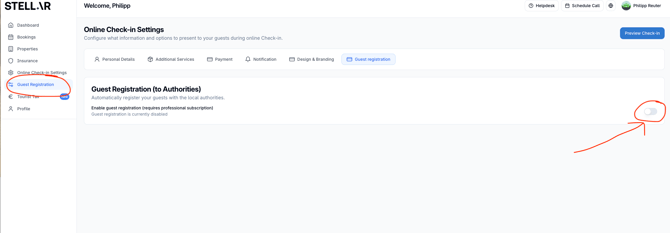
- Go to "Guest Registration"
- Enable Guest Registration (to Authorities)
- Enable each accommodation and then choose settings
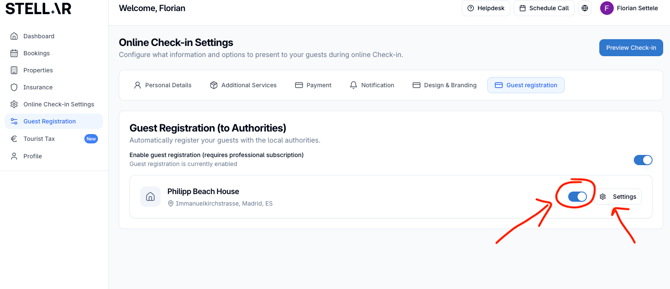
- Input the information about the accommodation
- Activate "Automatic sending to authority" and select ROSS1000
- Username: Your ROSS1000 account username.
- If you use SPID login, first generate a dedicated password via the in‑platform button—then use that in Stellar.
- Password: Your ROSS1000 account password or the SPID‑generated one.
- Facility Code (Codice Struttura): Found under Anagrafica → Gestione Strutture in your ROSS1000 account.
- Room quantity and Beds quantity: Values from the same Gestione Strutture section ("Tot. Camere" and "Tot. Letti").
Click Validate, then Save Changes.
3. Data Transmission Timing
Stellar will send guest data automatically to ROSS1000/Turismo 5 at 23:00 (11 pm) on the check‑in day.
You can track:
- Guest details in ISTAT's Storico Ospiti tab.
- Occupancy data in Check‑in → Gestione Disponibilità.
4. Limitations & Notes
- Document type and number are not transmitted via the web‑service. The ISTAT API does not support those fields. They appear only in manual entry forms to aid submission to the police "Alloggiati" portal—not part of ISTAT's software-to-software schema. Confirmed by GIES.
5. Troubleshooting
- If validation fails:
- Confirm username & password.
- If using SPID, verify you generated and used the SPID‑specific password.
- Check Facility Code, room and bed counts match the values in your ROSS1000 account.
- If issues persist, contact GIES support
---
Summary Table
| Input | What / Where to Find |
|---|---|
| Username & Password | ROSS1000/Turismo 5 account (SPID-generated as needed) |
| Facility Code | Anagrafica → Gestione Strutture → Codice Struttura |
| Room & Bed Quantities | Same menu → Tot. Camere & Tot. Letti |
| Transmission Time | 23:00 on check-in day |
| Viewing in ISTAT | Storico Ospiti; Check-in → Gestione Disponibilità |