Learn how to connect Stellar with ISTAT Puglia DMS. Step-by-step guide to configure properties, generate XML guest reports, and manually upload them to the PUGLIA SPOT portal for compliance.
1. Context
The Apulia region (Puglia) requires lodging providers to submit guest attendance data to the ISTAT Puglia–DMS system. This cannot be done automatically via API—you must generate and upload XML reports manually in the PUGLIA SPOT portal.
2. Configuration in Stellar
- In your Stellar (Chekin) dashboard:
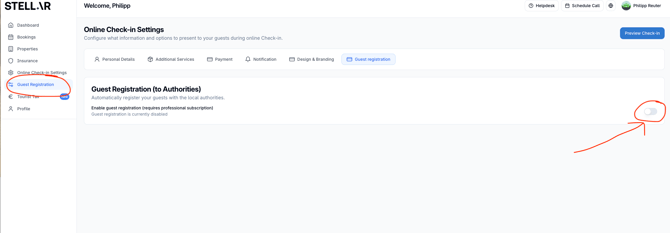
- Go to "Guest Registration"
- Enable Guest Registration (to Authorities)
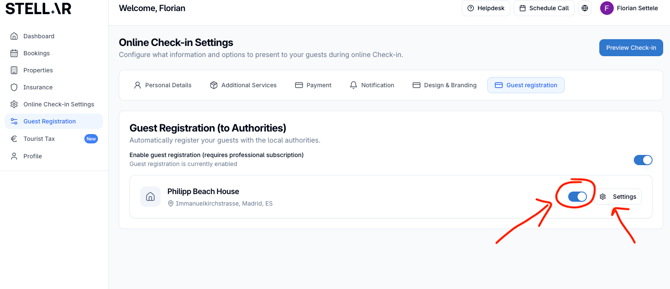
- Enable each accommodation and then choose settings
- Input the information about the accommodation
- Activate "Automatic sending to authority"
- Scroll to the ISTAT functionality toggle and enable it. Choose the option "Puglia - DMS".
- Provide:
- Number of rooms available for rent.
- Number of beds available for rent.
- Click Save Changes.
3. Report Generation & Submission
- Automatic data transmission is not supported for Puglia. Instead, Stellar generates an XML guest report for each property.
- To download the XML report:
- Go to Reservations in your Stellar dashboard.
- Click More actions.
- Select Download Puglia – SPOT Guest Reports.
- Choose the property and a date range. Stellar sends the XML report to your registered email address.
- Manually log into the PUGLIA SPOT portal and upload the XML file for each property. Each unit requires its own XML file.
Summary Table
| Step | Action |
|---|---|
| Configure legal settings | Go to Accommodation → Legal → enable "Puglia – DMS" → enter rooms & beds → Save |
| Generate report | Reservations → More actions → Download Puglia – SPOT Guest Reports → choose property & dates → receive XML via email |
| Submit data | Upload the individual XML to PUGLIA SPOT portal |